The Orbit Protocol

The best thing you can give your kid is nothing to do.

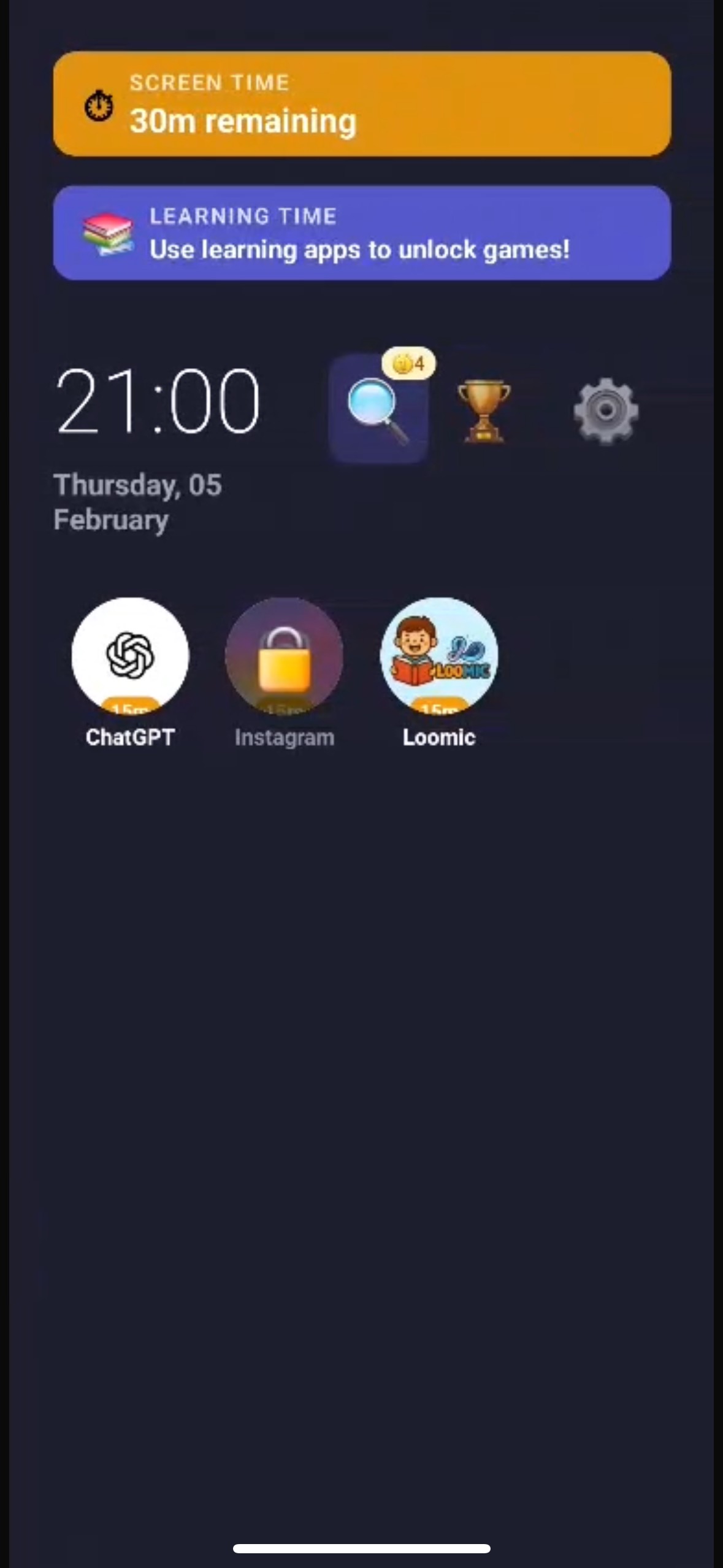
Algorithms are engineered to eliminate your child's boredom. Orbit protects it — on the phone they actually have.

Available now on Android. iPhone in beta — built on Apple Screen Time.

Orbit app — a phone experience designed for builders

The Problem

Their childhood isn't content for an algorithm.

Every day, billion-dollar algorithms compete for your child's attention. Infinite scroll. Autoplay. Dopamine loops. Engineered by the smartest people alive to eliminate one thing: boredom.

4.8h

Average daily screen time for kids aged 8–12

71%

of parents say their child can't handle boredom anymore

$0

What the attention economy pays for stealing your child's imagination

The result? A generation of consumers who could have been builders.

What We Believe

The Orbit Protocol

One core belief. Three practices. A different way to raise kids in a digital world.

Core Belief

Boredom builds builders.

The empty space is where imagination lives. Every inventor, artist, and entrepreneur started with nothing to do. We protect that space.

01

Screen time is earned.

Screens are a tool, not a right. Kids engage with the real world first — play, create, explore. Then they earn their time.

02

Curate, don't overwhelm.

Fewer apps, chosen with intention. Every app on their phone has a purpose. No bloat. No infinite feeds. No algorithmic rabbit holes.

03

Protect the empty space.

The hours without a screen aren't wasted. They're where builders are made. We guard that space so boredom can do its work.

The Tools

Software that protects boredom.

Orbit isn't another app that just blocks things. It's a phone experience designed around the Protocol.

Builder Time

Screen time limits that protect the hours for real-world exploration. Not a punishment — a design choice. Set daily limits, and Orbit handles the rest.

Protects Practice #3: The Empty Space

Deep Focus Mode

Distraction-free sessions for homework, reading, or creating. Time-locked so the phone can't tempt them back. Parents set the duration.

Supports Practice #1: Earned Screen Time

The App Menu

A parent-curated home screen with only the apps you approve. No app store browsing. No surprise downloads. Intentional by design.

Supports Practice #2: Curate, Don't Overwhelm

Curiosity Engine

When boredom sparks curiosity about the real world, Orbit's AI identifies objects and turns them into learning moments. Boredom to wonder in seconds.

Boredom → Curiosity → Builder

Built Secure. Built Private.

Deep device integration on Android. Apple Screen Time integration on iOS. Zero data selling. COPPA compliant. Our business model is the product — not your child's attention.

Built for the device you have

One Protocol. Two products.

Android and iPhone work very differently under the hood. Orbit doesn't pretend otherwise — pick the product that fits your family.

Available now

Orbit for Android

Replace the phone.

Orbit becomes the home screen. You pick the apps; everything else disappears. PIN-protected settings, system-level enforcement, and Builder-tivities when screen time runs out. Best for a kid's dedicated Android device — including the old phone in your drawer.

  • Full home-screen replacement & app curation
  • Hard-locked settings behind a parent PIN
  • Focus Mode, bedtime, per-app limits, earn-time tasks
  • “What's That?” AI Explorer
Get it on Google Play
In TestFlight beta

Orbit for iPhone

Reclaim the iPhone.

Apple won't let any app replace the launcher on iOS — so we don't pretend. Instead, Orbit uses Apple's Screen Time to schedule when each app is allowed, shield the rest, and turn the block screen into a Builder-tivity prompt. No generic “App Limit Reached” — a paper-airplane challenge.

  • Schedule windows & per-app time budgets
  • Built on Apple Family Controls / Screen Time
  • Builder-tivities on the iOS Shield screen (no one else does this)
  • Works best with a Screen Time passcode set
Join the iPhone beta

Same Protocol. Different mechanics. Honest about what each platform can and can't enforce.

Up and running in minutes.

No complicated setup. No hardware to buy. Just download, configure, and breathe.

1

Download Orbit

Install on your child's device — Android from Google Play, iPhone via TestFlight beta. Takes less than a minute either way.

2

Set the Protocol

Choose approved apps, set Builder Time limits, and configure your parent PIN. One guided setup.

3

Let Boredom Work

Orbit handles the rest. Your child explores, creates, and builds — with the phone as a tool, not a trap.

The Story Behind Orbit

“I'm not a child psychologist. I'm an Android developer who watched the most creative kids I know turn into zombie scrollers.

The algorithms didn't just steal their time — they stole their boredom. And boredom is where every builder starts.

I used to build Lego cities as a kid. Not because someone told me to. Because I had nothing else to do. That boredom made me an engineer.

So I'm building the antidote. Not another app that blocks things. A philosophy — with software to back it up.”

iPhone beta

Join the iPhone beta.

Already on Android? Orbit is live in the Play Store today. On iPhone? Join the TestFlight beta and help shape Orbit's schedule + shield experience before public launch.

0 parents on the iPhone beta list

We respect your privacy. Unsubscribe at any time. Zero spam. Read our Privacy Policy.

Frequently asked questions

They're kids, not engagement metrics.
Their childhood isn't content for an algorithm.
Boredom builds builders.